 SynthMaker
A song in code
A whole song as text you can read, change and send: sections hold their tracks, wires say what plays next, and SynthMaker plays it, every note on its exact sample.
New words
A Section is a part of the song, such as the intro or the drop. Everything inside its braces plays together, for as many bars as it says.
A Track lives inside a Section and plays one thing: a Pattern of hits, Notes, Chords or an Arp. Its output is wired to a sound.
A wire, ->, says what happens next: start -> intro -> verse plays the intro, then the verse.
1Open the song as code
This is a preview: open SynthMaker with ?songcode at the end of its address. Song as code appears above the Patch, with Harbour Lights in it, the first song written this way.
Press ▶ Play. The bar and beat beside it follow the song. ■ Stop stops it, and the song you had open comes back as it was.
2Read it
Song(tempo: 124, key: "D minor") comes first. Then each Section, its Tracks inside its braces: Track("Kick") { Pattern("x...x...x...x...") } is a kick on every beat, one character a sixteenth. x is an accent, o a hit, g a ghost and . a rest.
Under the Sections come the sounds, kick = Kick(volume: 0.644), and the wires: verse.Kick -> kick -> mix sends the Verse's Kick track to the kick sound, and the kick sound to the mix you hear.
At the end, each sound's own text, between sound Kick and end, exactly as its own Code view writes it.
3The same song as boxes
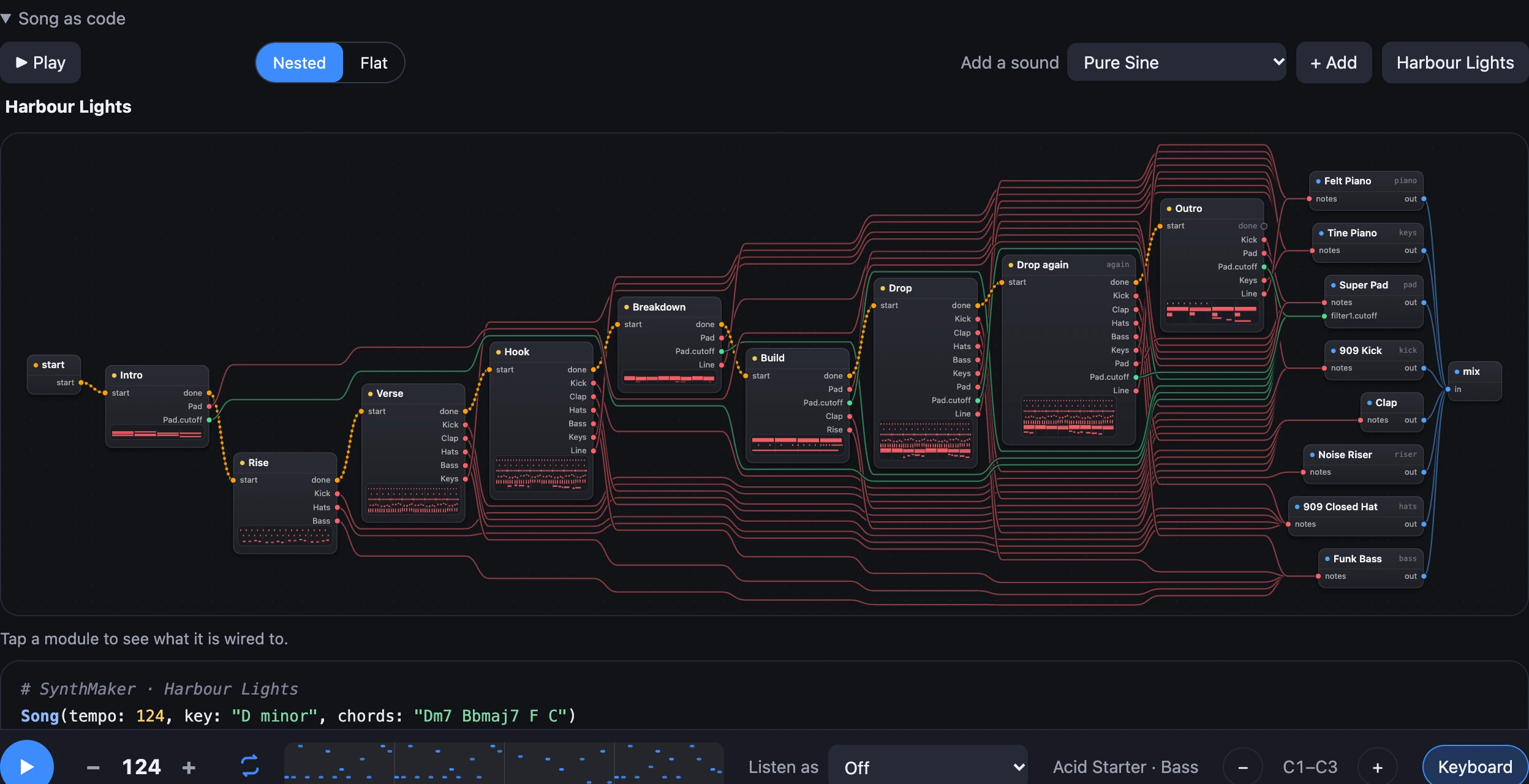
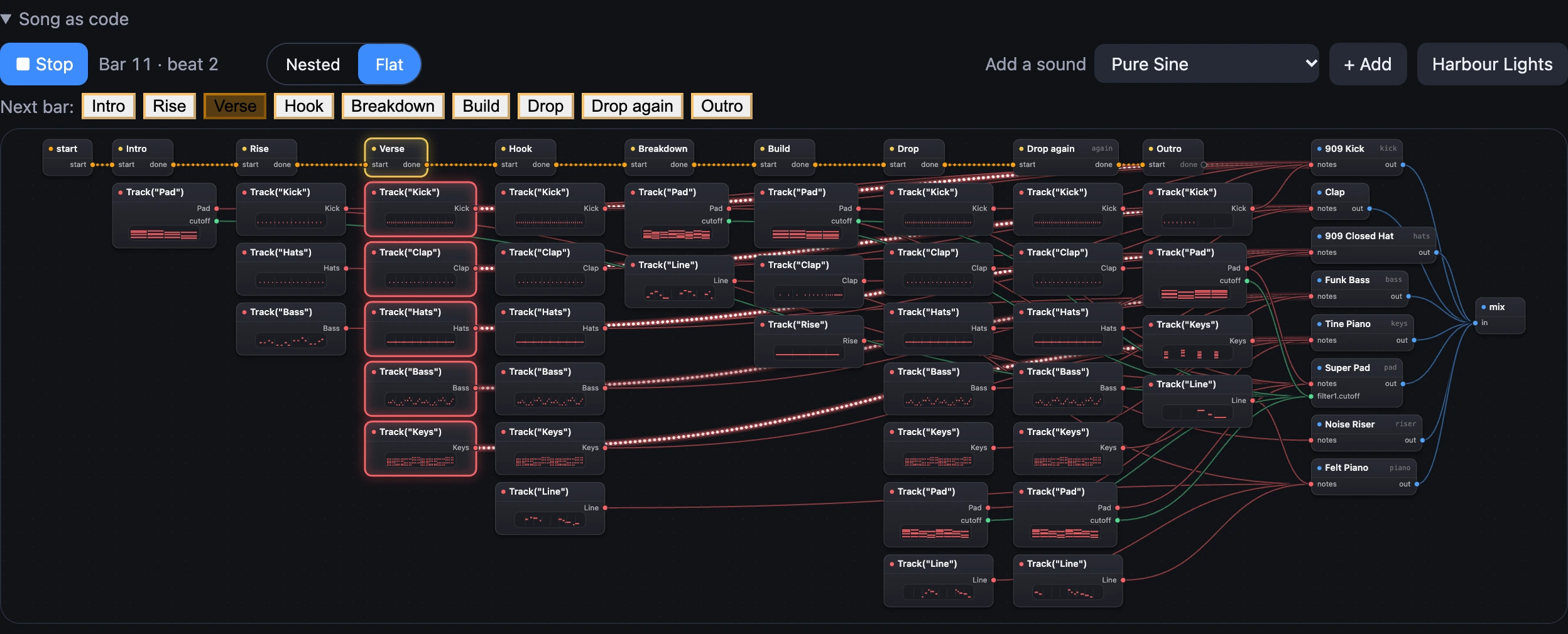
Above the code, the song is drawn as boxes and wires: start on the left, each Section, the sounds, and the mix on the right. An orange wire says what plays next; a red one takes a Track's notes to a sound; a mint one moves a setting inside a sound.
A Section's box shows its Tracks' notes over its bars. While the song plays, the Section playing now is lit, its line in the code too, and a bead runs along each wire as its notes go.
4Nested or Flat
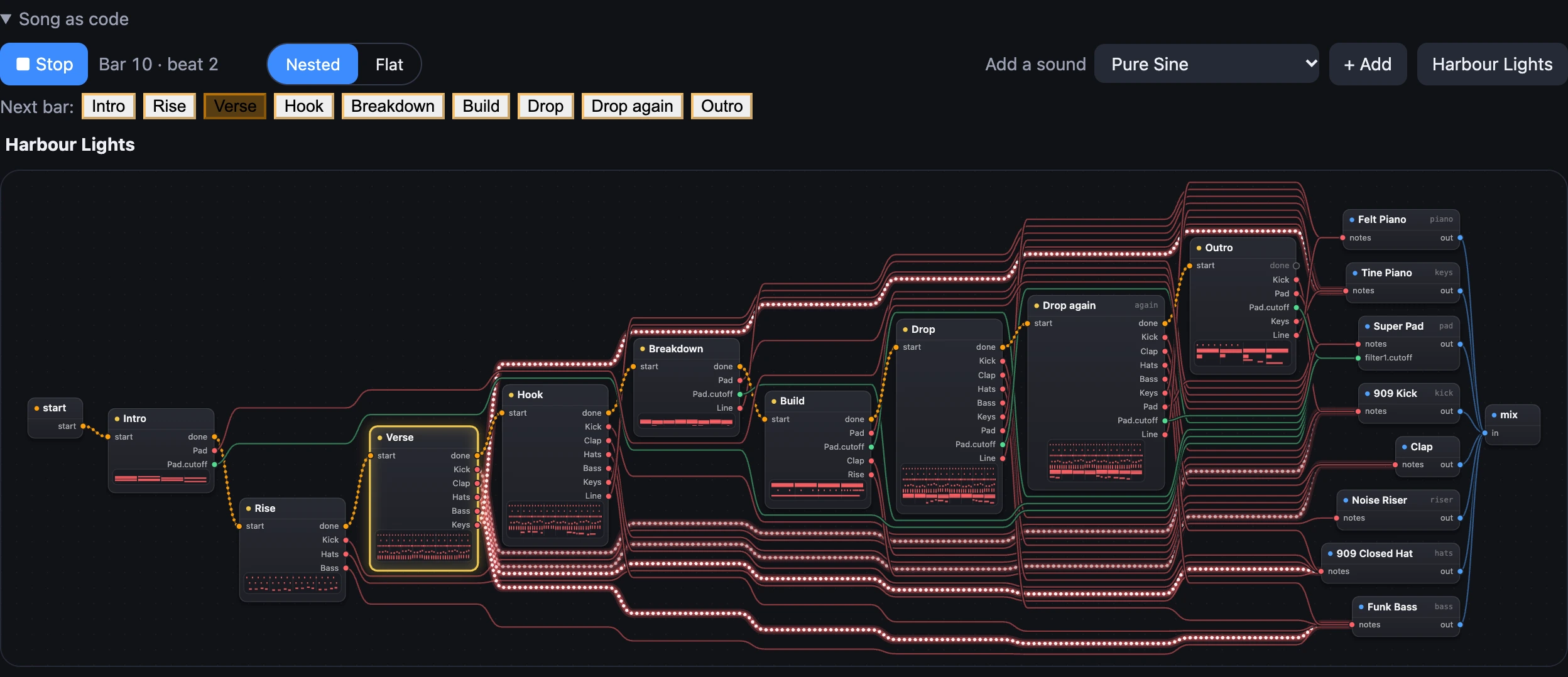
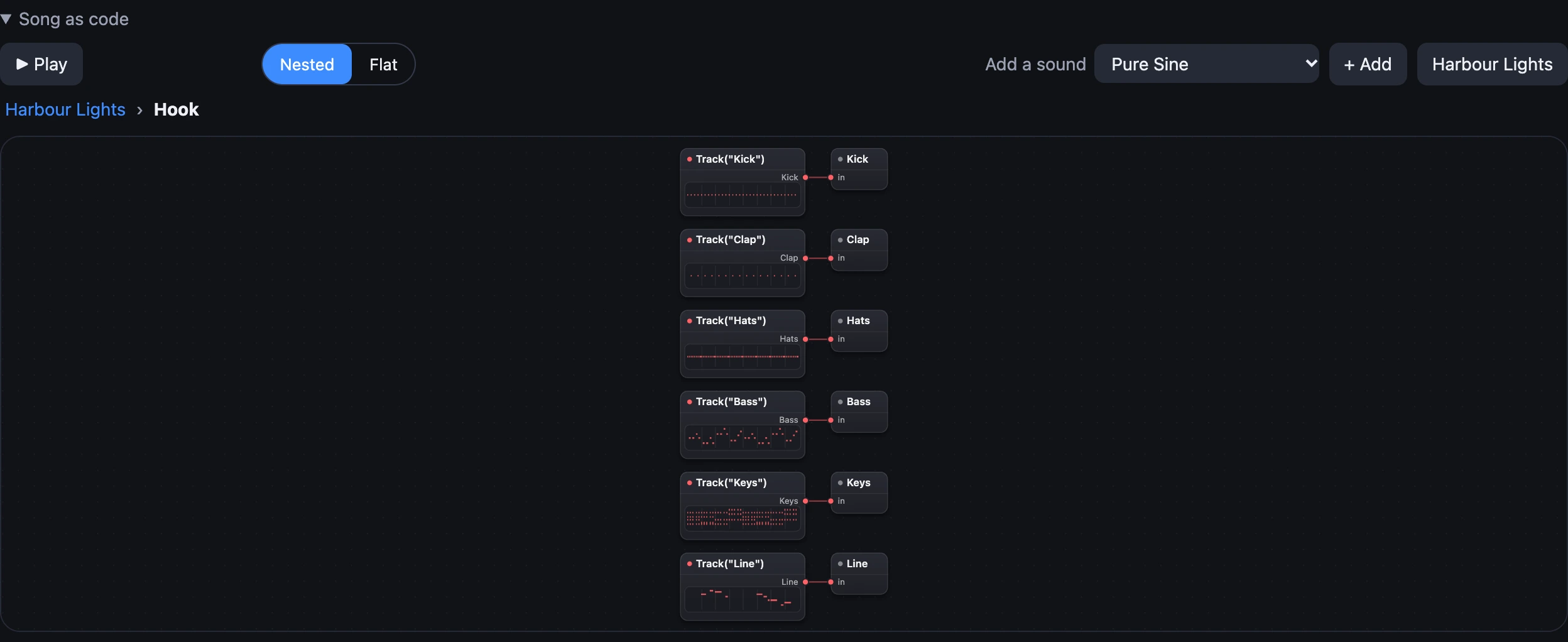
Nested shows a level at a time, as above. Flat shows every Section with its Tracks under it, all at once, each Track wired straight to its sound: the whole song on one screen. It's only another way of looking: the song and its code are the same, and nothing opens or changes in Flat.
SynthMaker remembers your choice in this browser.
5Play it live from pads
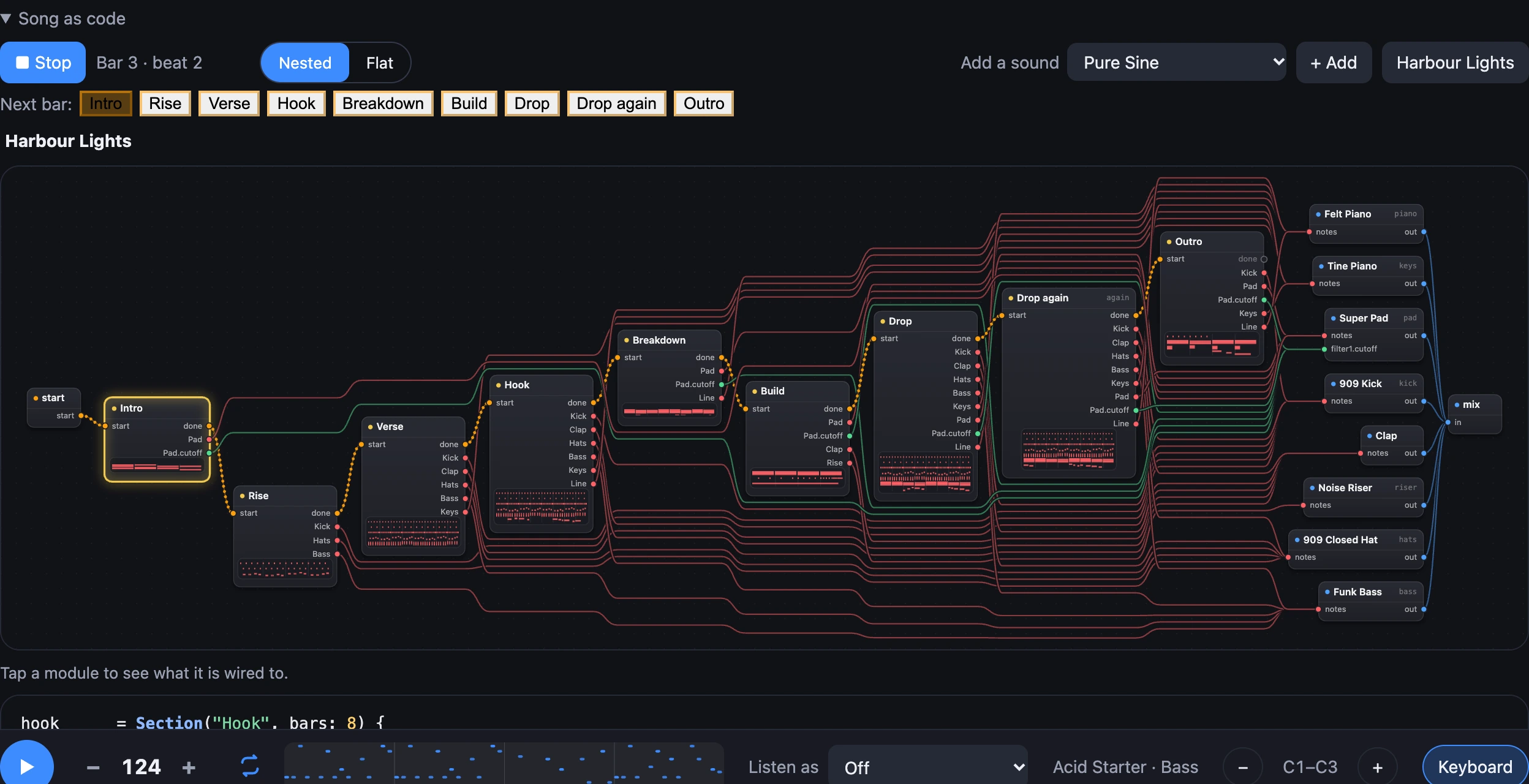
Harbour Lights has a row of pads above its boxes, one for each part: Intro, Rise, Verse … Outro. Press one (or its key, 1 to 8) and that Section comes in at the next bar, on time. What was playing stops there, and when the new part ends the song carries on along its wires.
A pad is lit while its Section plays, and glows while it waits for the bar. Press two pads in one bar and the last one plays. Press the part that's playing and it starts again from its top. Pressed while the song is stopped, a pad plays the song from that part.
The pads are a box like any other, and each pad is wired to the Section it starts:
pads = Pads("Intro", "Rise", "Verse", "Hook", "Breakdown", "Build", "Drop", "Outro", keys: "12345678")

pads[7] -> drop
pads[7] is the seventh pad. In the boxes it's an orange wire from that pad into the Drop's start. To wire a pad yourself, choose Edit wires, then drag from the pad to a Section, or write the line in the code. Undo takes it back.
6Add a sound
Pick a sound from the library under Add a sound and choose + Add. SynthMaker writes it into the song: a box for it, its wire into the mix, and its text at the end.
Then wire a Track into it, such as verse.Pad -> warmPad. A song has up to 8 sounds for now.
Try it
- Open SynthMaker with
?songcodeand press ▶ Play. - Change the Verse's kick to
Pattern("x..x..x.x...x..."), then Stop and Play it again. - While it plays, press Drop and listen for it at the next bar.
- Choose Harbour Lights to start again from the song as it was.
Remember
- Braces hold what plays together: a Section holds its Tracks, a Track what it plays.
- Wires say what happens next, and take a Track's notes to a sound.
- The boxes are the same song: double-click a Section to go inside, and watch what's playing light up.
- Flat shows the whole song at once; a pad wired into a Section starts it at the next bar.
- The text plays exactly: every note lands on its own sample, however the computer is called.